05 / Video Capture & Streaming
SpectreCast
Analog in. Live out.
Bring the video you already receive into the screen you already use. SpectreCast is an Analog FPV capture and OBS Studio setup solution for viewing, recording and sharing video from a compatible receiver. Keep the original on-screen display in view, build your scenes and choose where the video goes next.
- Analog FPV
- OBS Studio
- Capture · Record · Stream
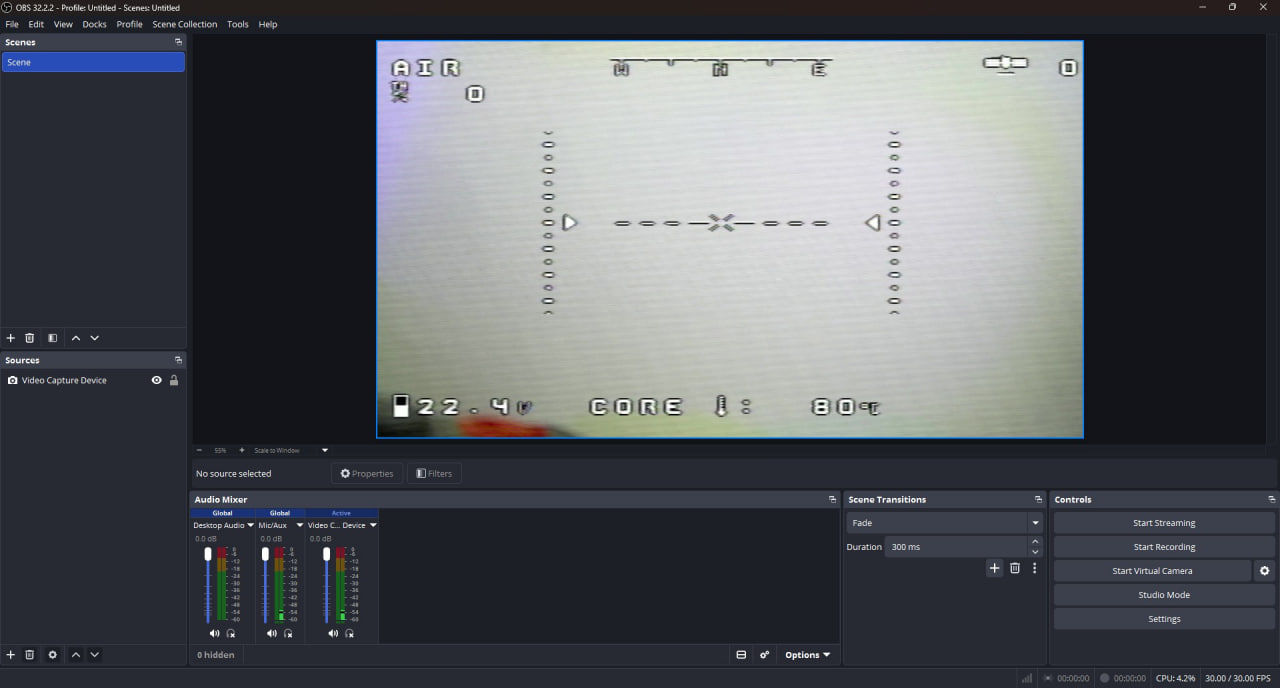
One clear path from capture to sharing
- 01Analog FPV video
- 02Compatible receiver
- 03Capture device
- 04OBS Studio
- 05View · Record · Stream
From receiver to screen
Connect a compatible Analog FPV receiver through a capture device and bring its video into OBS as a Video Capture Device source.
Keep the original OSD
View the picture with the on-screen display already embedded in the received video, alongside the source and audio controls in OBS.
Record for the next review
Configure local recording in OBS for demonstrations, review and video documentation. Choose the storage location and recording profile for your computer.
Build a scene that tells the story
Arrange the captured picture with titles, a logo or other OBS sources, and switch scenes for presentations and demonstrations.
Choose where the video goes
Configure an OBS streaming output for a compatible destination. Keep local viewing and recording available as part of the same workflow.
Extend with your video server
Optionally publish to MediaMTX for distribution to compatible viewers. The server endpoint, access and playback formats are configured for each deployment.